Product Update: BlastShield 2.0 Brings Device Posture, Agent Cloaking, and Post-Quantum Key Exchange

Executive Overview
BlastShield 2.0 is a major release. It changes three major things at once: 1) what BlastShield checks before granting access, 2) how session keys are protected against harvest-now-decrypt-later, and 3) what remote access actually feels like for the person using it.
New capabilities in this release:
- Device posture enforcement
- Agent cloaking
- Post-quantum key exchange
- BlastAccess hybrid rendering
- BlastAccess on phones and tablets
- Authorized Resources view
- Chat in BlastAccess
BlastShield already binds each login to a device enrolled with its own key. BlastShield 2.0 adds a second question: is that device healthy enough to trust, and should it have been admitted at all?
Where business systems connect persistently to the operational network and the Agent is deployed, BlastShield 2.0 cloaks the business-side endpoints of those connections and can restrict them to accept inbound traffic only over BlastShield.
What is new
1. Device posture enforcement
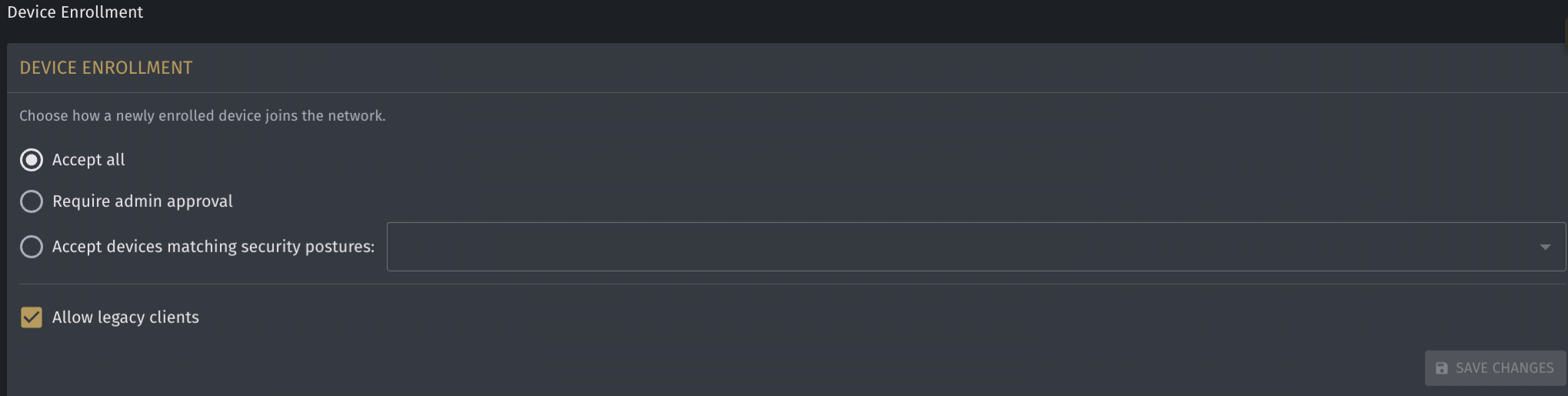
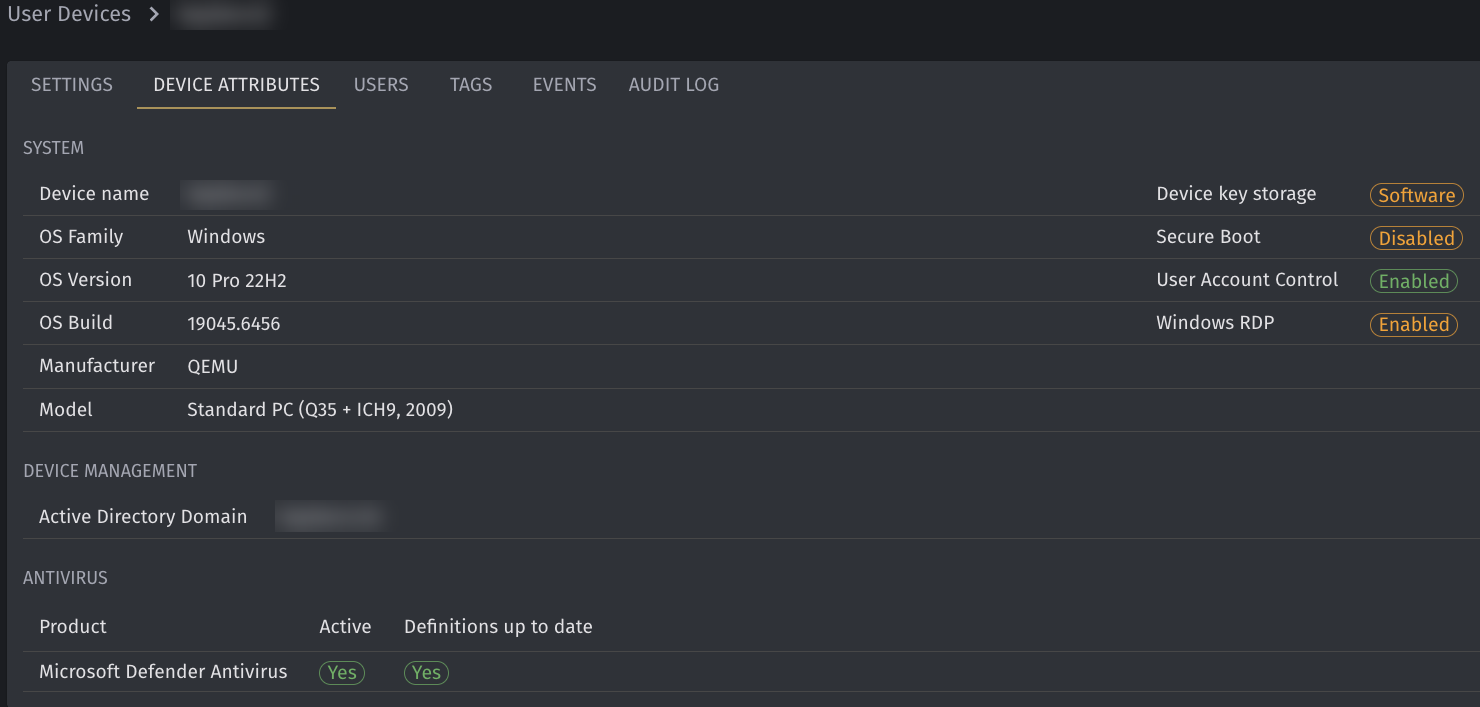
What it is. Device health becomes an independent factor in access decisions, alongside the user's identity. In the Orchestrator, a new pane appears for User Devices, where individual user devices can be configured for specific required security postures.
How it works. Two behaviors, and they are independently enforced:
Unknown devices can be refused outright. A device that has never been admitted to the network can be blocked from joining even when it presents fully valid, fully authenticated user credentials. The login being real is no longer sufficient. The machine has to be one you have accepted. Configuration options include Accept all, Require admin approval, or Accept devices matching a specific security posture. If Admin approval is set, a pop-up appears in the Orchestrator when a new device presents itself, and the device remains in limbo until approved. Internal note, not for external copy: with "Allow legacy clients" enabled, legacy (pre-2.0) clients bypass posture enforcement, so posture enforcement applies to 2.0 clients. Use only if asked.
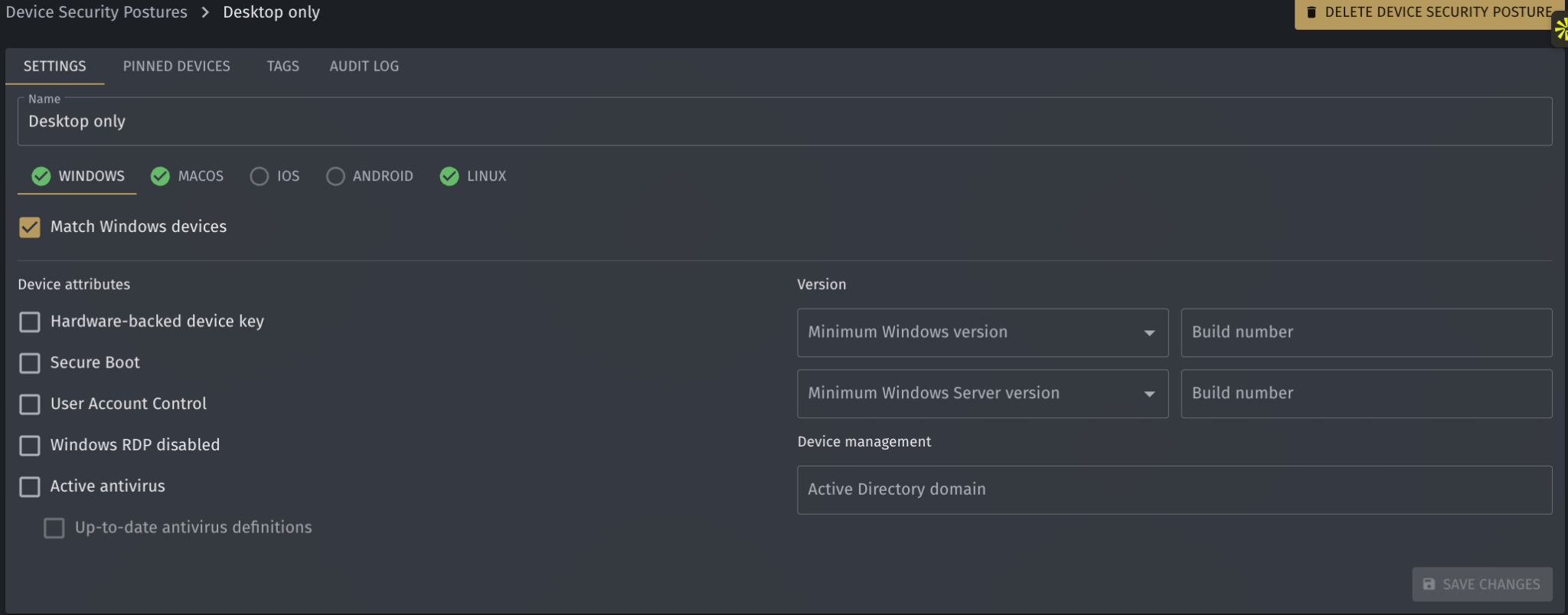
Compliance rules gate individual policies. You define what a healthy device looks like, and BlastShield checks it before granting a policy. If a device fails a rule, it is denied that policy even when its user sits squarely in the group entitled to it. Access becomes user-is-authorized AND device-is-compliant, not user-is-authorized alone. Posture is monitored continuously.
What it means for you. A stolen or phished credential still can't open a session from an attacker's laptop, because only enrolled devices can log in. With enrollment set to admin approval or posture matching, a device you never admitted can't join at all. Where posture rules or approval apply, a contractor's unmanaged machine doesn't inherit the contractor's entitlements just because the contractor's login is legitimate. A device that drifts out of compliance loses access to any policy that requires compliance, including sessions in progress, without an administrator stepping in.
Available Posture Checks:
2. Agent cloaking
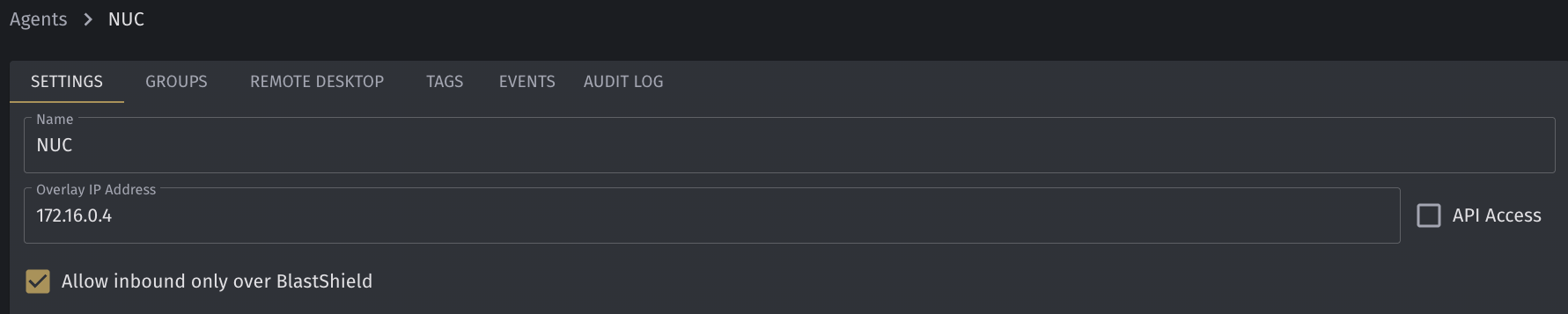
What it is. BlastShield's cloaking now extends to the endpoint running the Agent. As on the Gateway, unauthenticated packets are silently dropped, so a scanner cannot tell the host from empty address space.
How it works. The protected machine does not respond to scans, does not expose open ports, and does not appear as a reachable target to other hosts on its network. It remains fully usable to the people and systems that the BlastShield policy allows, and effectively absent from everything else.
Self-isolation. The Agent can also restrict its host to accept inbound traffic only over BlastShield, so the only connections that reach it are the ones BlastShield policy authorizes. With self-isolation on, a compromised or out-of-compliance machine elsewhere on the network cannot connect to the host except through BlastShield. Cloaking means the host does not answer others. Self-isolation makes it reachable only through BlastShield. The two work as a pair.
What it means for you. Cloaking now extends to the endpoint you connect from, not only the assets you connect to. An IT-side endpoint that answers its neighbors on a flat corporate LAN is an obvious way in. With Agent cloaking, it stops answering.
This matters most at the IT-OT boundary. For an operator who must run persistent connections from business systems into the operational network, cloaking the IT-side endpoints means they stop answering scans from the business network.
3. Post-quantum key exchange
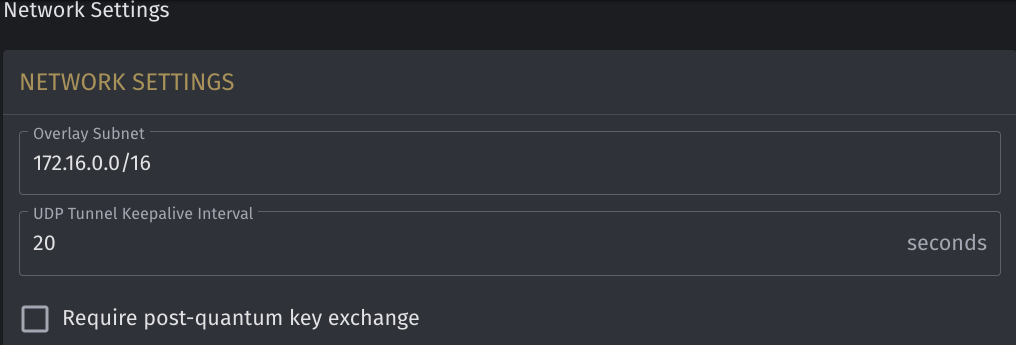
What it is. BlastShield 2.0 uses a hybrid ECDHE and ML-KEM key exchange, so session keys are protected against harvest-now-decrypt-later by a NIST-standardized post-quantum algorithm alongside the classical exchange. Post-quantum key exchange is used where both sides support it, and administrators can require it from the Orchestrator's network settings.
What it means for you. The exposure is not only in the future. Attackers can capture encrypted traffic today and decrypt it later, once the capability exists. Any session carrying process data, engineering credentials, network topology, or vendor access is worth capturing. A post-quantum key exchange protects the keys to that recorded traffic. Forward secrecy answers key compromise today; post-quantum key exchange answers harvest-now-decrypt-later.
For federal, defense, and federally connected operators, BlastShield 2.0 adds a hybrid ML-KEM exchange.
4. BlastAccess hybrid rendering
What it is. A new rendering mode that produces a genuinely sharp image on the screens operators actually look at.
How it works. Previous releases encoded the entire screen as video. Video encoding is efficient for motion and poor for fine detail. BlastShield 2.0 identifies when only a small region of the screen updates frequently and sends the rest as bitmaps. The result is a sharp image wherever the screen is not in constant motion.
What it means for you. This addresses small, blurry text in BlastAccess sessions. Consider an HMI where one trend widget or alarm banner refreshes continuously while the rest of the display is static tag names, setpoints, and alarm text. Under full-screen video encoding, that constant motion degraded the whole display. Now, the moving region is encoded as video, and the text remains crisp and legible.
Reading a setpoint correctly is not a cosmetic concern. An operator acting on remote data has to be able to read it.
5. BlastAccess on phones and tablets
What it is. BlastAccess now runs on iPhone, iPad, and Android phones and tablets, with full input support. The device needs the BlastShield Client and the Authenticator installed, and mobile sessions are recorded the same way as desktop sessions.
What it means for you. An on-call engineer can triage from the device already in their hand. No laptop, no waiting to get back to a desk. The release ships with complete input support, so a mobile session is interactive rather than a read-only view. This matters most in an emergency, when a new device is the only one available to reach a critical system. New devices still have to meet whatever admission and posture rules are configured.
6. Authorized Resources view
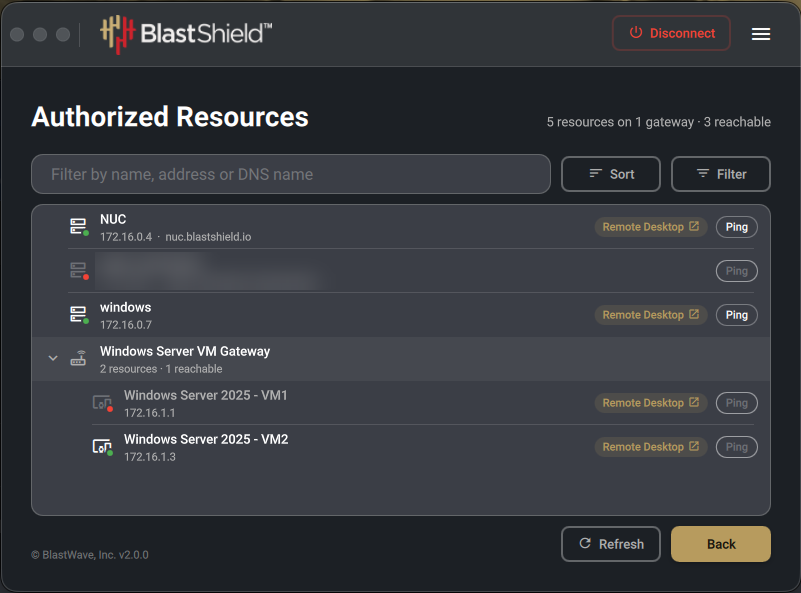
What it is. After authentication, a user can see the systems they are allowed to connect to in a resource view, including BlastAccess sessions.
What it means for you. An engineer can immediately see whether they have access to the systems they need to do their job. If a system isn't listed, BlastShield won't connect them to it.
7. Chat in BlastAccess
What it is. Administrators and the person at the remote computer can chat directly with connected BlastAccess users. A chat permission controls who can use it.
What it means for you. Enables “over-the-shoulder” troubleshooting and direct interactions between administrators and users.
Who this release is for
Water and wastewater utilities. Device posture and agent cloaking address two exposures where IT and OT responsibilities overlap or contractors connect regularly: unmanaged devices holding valid credentials and IT-side machines serving as an entry path.
Manufacturing. Your plant may need business systems permanently connected to the operational network. Where the Agent is deployed, the business-side endpoints of those connections are cloaked and can be set to accept inbound traffic only over BlastShield.
Federal, defense, and federally connected operators. BlastShield 2.0 adds a hybrid ML-KEM exchange.
Any operator relying on remote support. The BlastAccess improvements make HMI screens legible over secure remote access.
How to get started
BlastShield 2.0 is available now. The full list of changes, including fixes, is in the release notes. Existing customers can reach out to our customer support team with questions about upgrading.
To see it for yourself, schedule a demo. We scan a protected controller in front of you, then have an authorized operator reach the same device. Bring your own scenario rather than watching ours.
Frequently Asked Questions About BlastShield 2.0
What is BlastShield 2.0?
BlastShield 2.0 is a major release of BlastWave’s OT cybersecurity platform that expands device trust, network cloaking, secure remote access, and cryptographic protection. New capabilities include device posture enforcement, Agent cloaking, Agent self-isolation, hybrid post-quantum key exchange, improved BlastAccess rendering, mobile BlastAccess support, an Authorized Resources view, and in-session chat.
How does device posture enforcement work in BlastShield 2.0?
BlastShield 2.0 treats device health as an independent access factor alongside user identity. Administrators can configure whether new devices are automatically accepted, require administrator approval, or must meet a defined security posture before enrollment. Compliance rules can also be applied to individual access policies, and device posture is monitored continuously.
Can BlastShield 2.0 block access even when a user has valid credentials?
Yes. A user with valid credentials can still be denied access if the device is unknown, has not been approved, or does not meet the required security posture. This helps prevent stolen or phished credentials from being used on an attacker-controlled or unmanaged device.
What happens if a device becomes noncompliant during a session?
BlastShield 2.0 continuously monitors device posture. If a device falls out of compliance, it can lose access to policies that require compliance, including sessions already in progress, without requiring an administrator to intervene manually.
What is Agent cloaking in BlastShield 2.0?
Agent cloaking extends BlastShield’s cloaking capability to endpoints running the BlastShield Agent. Unauthenticated packets are silently dropped, so scanners cannot identify the host as a reachable system. The endpoint does not expose open ports or respond to unauthorized network probes while remaining available to users and systems permitted by BlastShield policy.
What is Agent self-isolation?
Agent self-isolation restricts a protected host so inbound traffic is accepted only through BlastShield. When used with Agent cloaking, the host becomes both undiscoverable to unauthorized systems and reachable only through policy-authorized BlastShield connections.
What is the difference between Agent cloaking and Agent self-isolation?
Agent cloaking prevents unauthorized systems from discovering or scanning the endpoint. Agent self-isolation goes further by restricting inbound connections so they must come through BlastShield. Together, they reduce the endpoint’s exposure to other systems on the surrounding network.
Does BlastShield 2.0 support post-quantum cryptography?
Yes. BlastShield 2.0 uses a hybrid ECDHE and ML-KEM key exchange where both sides support it. ML-KEM is used alongside the classical key exchange to protect session keys against harvest-now-decrypt-later threats. Administrators can also require post-quantum key exchange through the Orchestrator’s network settings.
What is a harvest-now-decrypt-later attack?
Harvest-now-decrypt-later describes an attack strategy in which encrypted traffic is captured today and stored until future computing capabilities make it possible to decrypt that traffic. BlastShield 2.0 addresses this risk by adding a post-quantum key exchange to supported sessions.
How does BlastShield 2.0 improve BlastAccess screen quality?
BlastAccess now uses hybrid rendering. Instead of encoding the entire screen as video, BlastShield identifies areas with frequent motion and renders those regions as video while sending less dynamic areas as images. This helps keep static text, tag names, setpoints, and alarm information sharp and readable.
Can BlastAccess be used on phones and tablets?
Yes. BlastAccess now supports iPhone, iPad, Android phones, and Android tablets with interactive input. Mobile devices require the BlastShield Client and Authenticator, and mobile sessions are recorded in the same manner as desktop sessions.
What is the Authorized Resources view?
The Authorized Resources view shows authenticated users which systems and BlastAccess sessions they are permitted to access. If a resource is not shown, BlastShield will not connect the user to it.
Does BlastAccess support chat?
Yes. BlastShield 2.0 adds chat within BlastAccess so administrators and the person at the remote computer can communicate with connected BlastAccess users. Administrators can control chat availability through permissions.
Who is BlastShield 2.0 designed for?
BlastShield 2.0 is designed for organizations operating critical infrastructure and OT environments, including water and wastewater utilities, manufacturers, federal and defense environments, and organizations that depend on remote technical support or contractor access.
Why is BlastShield 2.0 useful for water and wastewater utilities?
Water and wastewater utilities often depend on contractors and systems that cross the IT-OT boundary. Device posture enforcement can restrict unmanaged devices, while Agent cloaking can reduce the visibility of business-side endpoints that maintain connections into operational networks.
Why is BlastShield 2.0 useful for manufacturing?
Manufacturers may require business systems to maintain persistent connections to operational environments. Where the BlastShield Agent is deployed, those endpoints can be cloaked and configured to accept inbound traffic only through BlastShield.
How does BlastShield 2.0 improve secure remote OT access?
BlastShield 2.0 combines device admission controls, continuous posture enforcement, encrypted access, improved remote-session rendering, mobile access, authorized-resource visibility, and in-session communication. Together, these capabilities make remote OT access more restrictive for unauthorized users while improving usability for authorized operators and engineers.
How to Strengthen OT Remote Access With BlastShield 2.0
BlastShield 2.0 can be configured to reduce the risk of unauthorized devices, exposed endpoints, lateral movement, and long-term cryptographic compromise while improving the experience of authorized remote users.
Step 1: Define Device Admission Rules
Open the User Devices pane in the Orchestrator and determine how new devices should be admitted.
Depending on your security requirements, you can configure BlastShield to:
- Accept all devices
- Require administrator approval
- Accept only devices that meet a defined security posture
For higher-risk OT environments, use administrator approval or posture-based admission so a valid username alone is not enough to introduce a new device.
Step 2: Define Device Posture Requirements
Establish the security conditions a device must satisfy before it can receive access.
Apply compliance requirements to the policies that protect sensitive systems, contractor connections, or OT resources. BlastShield continuously monitors device posture, allowing access to be withdrawn if a device becomes noncompliant.
Step 3: Enable Agent Cloaking Where IT Connects to OT
Identify business-side endpoints that maintain persistent connections into the operational environment and deploy the BlastShield Agent where appropriate.
Enable Agent cloaking so unauthorized systems cannot discover the endpoint through ordinary scans or probes. Unauthenticated traffic is silently dropped while authorized BlastShield users and systems retain access.
Step 4: Configure Agent Self-Isolation
Enable self-isolation on endpoints that should accept inbound traffic only through BlastShield.
Used together, cloaking and self-isolation make the host difficult for unauthorized systems to discover and prevent direct inbound connections that bypass BlastShield policy.
Step 5: Configure Post-Quantum Key Exchange
Review the network settings in the Orchestrator and enable or require post-quantum key exchange where appropriate.
BlastShield 2.0 uses hybrid ECDHE and ML-KEM when supported, helping protect session keys from harvest-now-decrypt-later attacks while retaining the classical key exchange.
Step 6: Use BlastAccess for Remote OT Sessions
Configure authorized users to reach OT systems through BlastAccess rather than exposing generic remote desktop services directly.
BlastAccess provides controlled remote sessions while BlastShield policies determine which users and devices can reach specific resources.
Step 7: Use Hybrid Rendering for HMI Visibility
Take advantage of BlastAccess hybrid rendering when users need to read detailed HMI screens remotely.
Frequently changing areas can be rendered as video while static portions remain image-based, helping preserve the clarity of setpoints, alarm text, tag names, and other operational information.
Step 8: Enable Mobile Access for On-Call Personnel
Configure authorized engineers and operators to use BlastAccess from supported iPhone, iPad, and Android devices.
The mobile device must have the BlastShield Client and Authenticator and must still satisfy any configured enrollment and posture requirements.
Step 9: Verify Authorized Resources
Have users review the Authorized Resources view after authentication.
This gives each user a clear view of the systems and BlastAccess sessions they are permitted to reach. Resources outside their authorization do not appear as available connections.
Step 10: Enable BlastAccess Chat Where Appropriate
Configure chat permissions for teams that need real-time communication during remote troubleshooting.
This allows administrators, remote users, and personnel at the remote computer to coordinate directly within the BlastAccess session.
Step 11: Test Access From Both Authorized and Unauthorized Devices
Validate your configuration by attempting access from different device states.
Confirm that:
- Approved and compliant devices receive the intended access
- Unknown devices are rejected when admission controls require it
- Noncompliant devices lose access to compliance-gated policies
- Cloaked Agents do not respond to unauthorized scans
- Self-isolated hosts reject inbound traffic outside BlastShield
- Authorized users can reach the intended OT systems
Step 12: Review Policies Regularly
As contractors, devices, systems, and operational requirements change, review device admission rules, posture policies, access permissions, cloaking settings, and remote-access entitlements.
The objective is to maintain least-privilege access while keeping authorized OT users productive.
The Result
With BlastShield 2.0, remote access can require both an authorized user and an acceptable device. Endpoints at the IT-OT boundary can be cloaked and self-isolated, supported sessions can use post-quantum key exchange, and operators can access authorized resources through improved desktop and mobile BlastAccess sessions.
The result is a remote-access architecture designed to reduce device risk, endpoint exposure, unauthorized connectivity, and long-term cryptographic risk without sacrificing usability for authorized OT personnel.



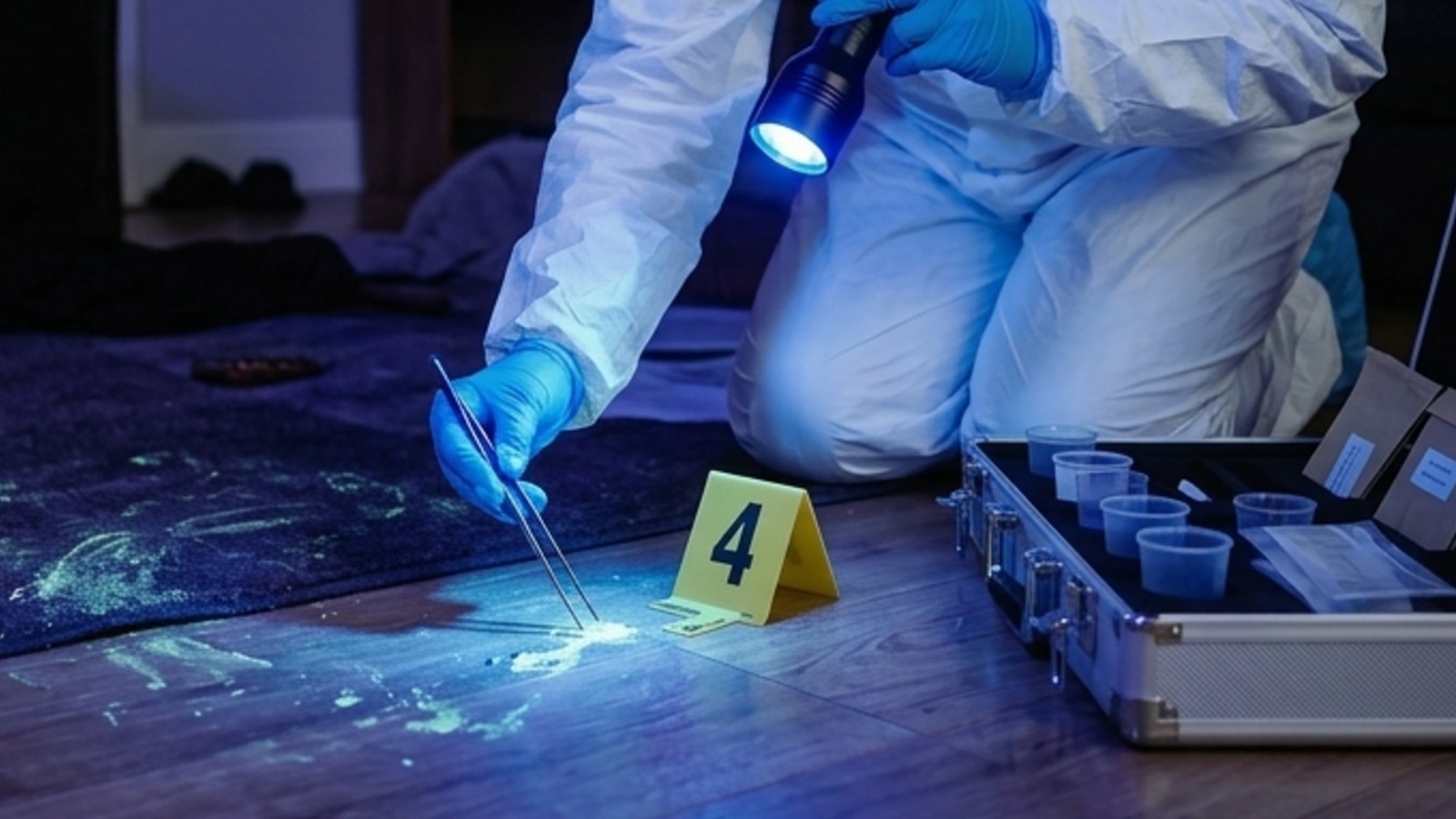



American Water’s cyber incident shows why water utilities need stronger OT isolation to stop IT breaches from threatening critical infrastructure operations and availability.
Explore the complete analysis of 23 OT attacks that defeated firewalls, VPNs, and air gaps.
.svg)
.svg)